04 Day Google ID Teacher Training of MTs at PECTAA
04 Day Google ID Teacher Training of MTs at PECTAA (HQ) Lahore and PECTAA Islamabad — Everything You Need to Know
Published on Education47 | May 26, 2026
Let me be honest with you — when I first heard about “Google ID Teacher Training,” I thought it was just another checkbox exercise. You know the type: sit through a session, get a certificate, forget everything by Monday. But after going through the actual notification from PECTAA and understanding what this training really involves, I changed my mind completely. This is genuinely one of the more practical initiatives the Punjab Education, Curriculum, Training & Assessment Authority has rolled out in recent memory.
If you’re a Master Trainer (MT) in Punjab, or you’re managing MTs at the district level, this article will walk you through everything — what the training is, who it’s for, when it’s happening, and what you should do right now to make sure you don’t miss it.
What Is the 04 Day Google ID Teacher Training?
This is a four-day structured training program organized by PECTAA (Punjab Education, Curriculum, Training & Assessment Authority), specifically designed for Master Trainers (MTs). The training focuses on Google ID — which essentially means getting teachers set up with, and properly using, Google’s ecosystem of tools for education.
Think Google Classroom, Google Meet, Google Drive, Google Docs, Google Forms — all of it. For teachers in government schools across Punjab, having a properly configured Google ID and knowing how to use these tools isn’t just a “nice to have” anymore. It’s becoming essential infrastructure.
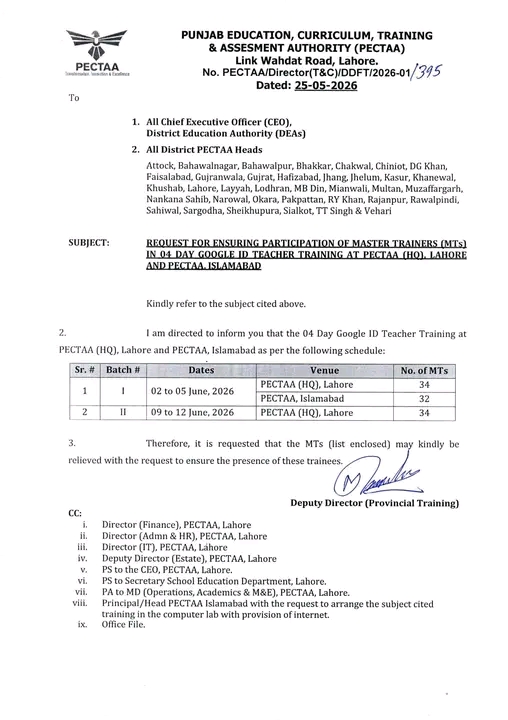
The official notification, bearing number PECTAA/Director(T&C)/DDFT/2026-01/395, was issued on 25-05-2026 and is addressed to:
- All Chief Executive Officers (CEOs), District Education Authorities (DEAs)
- All District PECTAA Heads
Who Is This Training For?
This training is specifically for Master Trainers (MTs) — not regular teachers. MTs are the people who, once trained, go back to their districts and train others. So the impact of this one training multiplies across hundreds of classrooms.
The districts included in this notification are extensive:
Attock, Bahawalnagar, Bahawalpur, Bhakkar, Chakwal, Chiniot, DG Khan, Faisalabad, Gujranwala, Gujrat, Hafizabad, Jhang, Jhelum, Kasur, Khanewal, Khushab, Lahore, Layyah, Lodhran, MB Din, Mianwali, Multan, Muzaffargarh, Nankana Sahib, Narowal, Okara, Pakpattan, RY Khan, Rajanpur, Rawalpindi, Sahiwal, Sargodha, Sheikhupura, Sialkot, TT Singh, and Vehari.
That’s virtually every major district in Punjab — so this is a province-wide initiative.
Training Schedule — Batch-Wise Breakdown
Here’s the exact schedule as per the official PECTAA notification:
| Sr. # | Batch # | Dates | Venue | No. of MTs |
|---|---|---|---|---|
| 1 | I | 02 to 05 June, 2026 | PECTAA (HQ), Lahore | 34 |
| 1 | I | 02 to 05 June, 2026 | PECTAA, Islamabad | 32 |
| 2 | II | 09 to 12 June, 2026 | PECTAA (HQ), Lahore | 34 |
So there are two batches, with training happening at two venues — PECTAA’s headquarters in Lahore and the PECTAA office in Islamabad.
Batch I runs from 2nd to 5th June 2026, accommodating 34 MTs at Lahore HQ and 32 MTs at Islamabad simultaneously.
Batch II runs from 9th to 12th June 2026, with 34 MTs at Lahore HQ.
What Does “Google ID Teacher Training” Actually Cover?
Based on PECTAA’s broader digital training initiatives and Google’s own educator certification programs, a 4-day Google ID training for teachers typically covers:
Day 1 — Setting Up Your Google Educator Account
- Creating and verifying a professional Google account
- Configuring Google Workspace for Education settings
- Understanding privacy and data security within Google’s platform
Day 2 — Google Classroom & Drive
- Setting up and managing Google Classroom
- Organizing resources in Google Drive
- Sharing files and folders with students and colleagues
- Using Google Drive offline
Day 3 — Google Tools for Teaching
- Google Forms for assessments and quizzes
- Google Docs and Slides for collaborative work
- Google Meet for virtual lessons and parent communication
- Google Sites for creating class or school web pages
Day 4 — Practical Application & Assessment
- Hands-on practice with real classroom scenarios
- Creating a sample lesson using Google tools
- Peer review and feedback
- Certification process overview
The training venue at PECTAA Islamabad has been specifically requested to provide computer lab facilities with internet access — which tells you this is a hands-on, practical training, not just lectures.
Why This Training Matters More Than You Think
I’ve seen plenty of education department circulars get filed away and forgotten. This one feels different, and here’s why.
The cascade model works — when it’s done right. Each MT trained here goes back to their district and trains other teachers. With 34 MTs per batch and multiple batches, you’re looking at potentially thousands of teachers eventually getting equipped with Google tools.
Google tools are free and already available. Unlike some initiatives that require expensive software or hardware, Google Workspace for Education is free for schools. The barrier isn’t cost — it’s awareness and proper setup. That’s exactly what this training addresses.
Digital documentation and communication are no longer optional. School systems across Punjab are increasingly using digital platforms for attendance, reporting, and communication. Teachers who aren’t comfortable with basic Google tools are getting left behind.
For practical guidance on using Google Workspace in education, check out Google for Education’s official resource hub, which includes self-paced training modules that complement exactly what PECTAA is covering in this program.
What CEOs and District PECTAA Heads Need to Do Right Now
The notification specifically requests that MTs (from the enclosed list) be relieved from their current duties to ensure their presence at the training. This is important — it means district heads have a clear responsibility here.
If you’re a CEO or District PECTAA Head, here’s your action list:
- Check the enclosed MT list provided with the notification
- Issue relieving orders for the nominated MTs well before the training dates
- Confirm venue logistics — especially for Islamabad, coordinate with Principal/Head PECTAA Islamabad for computer lab and internet access
- Keep records of attendance for accountability purposes
If you’re an MT who thinks you might be on the list but haven’t received confirmation, contact your District PECTAA Head immediately. The training dates are in early June — there’s not a lot of runway here.
Common Mistakes to Avoid
Having followed several PECTAA training cycles, here are the pitfalls that trip people up:
1. Waiting for someone to tell you — you need to be proactive. If you’re an MT in any of the listed districts, don’t assume the notification will trickle down to you automatically. Follow up with your district head.
2. Showing up without a working Google account. The training is about Google ID — come prepared with a Gmail address that you actually use and remember the password for. Sounds obvious, but it causes delays every single time.
3. Not bringing a personal device. Even if the venue has computers, having your own laptop or tablet means you can practice during the training and refer back to settings later. PECTAA Islamabad specifically arranged for computer labs, but bring your own if you can.
4. Treating it as a passive experience. Four days is actually substantial for a training program. The MTs who get the most out of it are the ones asking questions, doing the hands-on exercises, and taking notes they’ll actually use.
5. Not following up with district-level training afterward. The whole point of training MTs is for them to cascade it further. If you complete this training and don’t plan your own district sessions within 4-6 weeks, the impact is wasted.
The PECTAA Context — Why Their Training Programs Matter
PECTAA isn’t a new organization, but its role has grown significantly. Established under the Punjab government, it handles curriculum development, teacher training, and educational assessments across the province.
For teachers and education professionals in Punjab, understanding PECTAA’s structure helps you navigate opportunities like this one. Their training programs are generally well-organized, and the certifications carry weight within the provincial education department.
For more on teacher professional development standards in Pakistan, the UNESCO IIEP resource on teacher training quality provides excellent international context that aligns with what PECTAA is trying to achieve domestically.
Why Google Tools Specifically?
You might wonder why the focus is on Google rather than Microsoft or other platforms. A few practical reasons:
- Google Workspace for Education is free for qualifying educational institutions, including government schools in Pakistan
- Chromebooks (Google’s hardware) have been distributed in various government school programs across Pakistan
- Google Forms is widely used for assessment collection in digital reporting initiatives
- Cross-device compatibility — Google tools work on any device with a browser, which matters when teachers and students have mixed hardware
The Google for Education Pakistan page has specific resources for Pakistani educators, including information on getting your school set up with Google Workspace at no cost.
Quick Reference — Key Details at a Glance
- Issuing Authority: Punjab Education, Curriculum, Training & Assessment Authority (PECTAA)
- Notification Number: PECTAA/Director(T&C)/DDFT/2026-01/395
- Date Issued: 25 May 2026
- Training Duration: 4 days per batch
- Batch I Dates: 02–05 June 2026
- Batch II Dates: 09–12 June 2026
- Venues: PECTAA HQ, Lahore & PECTAA, Islamabad
- Target Participants: Master Trainers (MTs) — nominated by district
- Total MTs (visible batches): 100 across listed sessions
FAQs — Questions People Actually Ask
Q: Can I register myself, or is selection done by PECTAA?
A: Selection is done centrally — PECTAA has provided an enclosed list of nominated MTs to each CEO and District PECTAA Head. You cannot self-register for this specific batch. Contact your district head to check if you’re nominated.
Q: What if I’m nominated but can’t attend on the given dates?
A: You’d need to formally communicate through your CEO to PECTAA. However, given that relieving orders are being issued, this is treated as an official duty — not optional participation.
Q: Will there be a certificate at the end?
A: PECTAA training programs typically issue certificates of completion. Additionally, if the training covers Google’s certification pathway, there may be an opportunity to appear for Google’s own Certified Educator exam — though this would depend on the specific curriculum of this batch.
Q: Is there accommodation provided for out-of-city MTs?
A: The notification doesn’t specify accommodation arrangements. You should confirm this with your District PECTAA Head or directly with PECTAA HQ at Link Wahdat Road, Lahore.
Q: What preparation should I do before attending?
A: Create or confirm access to a Google account, practice logging into Google Classroom and Google Drive beforehand, and if possible, go through Google’s free Fundamentals of Digital Marketing or Applied Digital Skills modules to get a head start.
Q: Which districts are covered under this notification?
A: All major districts of Punjab are included — Attock, Bahawalnagar, Bahawalpur, Bhakkar, Chakwal, Chiniot, DG Khan, Faisalabad, Gujranwala, Gujrat, Hafizabad, Jhang, Jhelum, Kasur, Khanewal, Khushab, Lahore, Layyah, Lodhran, MB Din, Mianwali, Multan, Muzaffargarh, Nankana Sahib, Narowal, Okara, Pakpattan, RY Khan, Rajanpur, Rawalpindi, Sahiwal, Sargodha, Sheikhupura, Sialkot, TT Singh, and Vehari.
Q: Is there an online option for this training?
A: Based on the official notification, this is an in-person training requiring physical presence at PECTAA HQ Lahore or PECTAA Islamabad. No online alternative is mentioned.
Conclusion — Don’t Let This One Slip Through
If there’s one thing I’ve learned following education department notifications, it’s that the ones that seem purely administrative often have the most practical impact on classrooms. This Google ID Teacher Training is exactly that kind of initiative.
Four days of proper, hands-on training with Google tools — delivered to Master Trainers who then cascade it to hundreds of other teachers — is genuinely valuable. The fact that PECTAA has organized this across two venues simultaneously shows this isn’t a token gesture.
If you’re an MT in Punjab, be proactive. Check with your district head. Confirm your nomination status. Show up prepared.
For more notifications, training schedules, and education department updates from Punjab, visit Education47 — we cover PECTAA circulars, job notifications, and teacher training programs as they’re released.
Reference: Official PECTAA Notification No. PECTAA/Director(T&C)/DDFT/2026-01/395, dated 25-05-2026, issued by the Deputy Director (Provincial Training), Punjab Education, Curriculum, Training & Assessment Authority, Link Wahdat Road, Lahore.
External References:
1. Google for Education — https://edu.google.com
2. UNESCO IIEP Teacher Policy Resources — https://www.iiep.unesco.org/en/our-expertise/teacher-policy
3. Google Educator Certification — https://edu.google.com/intl/ALL_pk/products/certifications/