Compulsory Registration for Hotels and Guest Houses
Over the last few years of running and managing web platforms, I have noticed that the lines between pure digital development and daily physical operations have completely blurred. A friend of mine who runs a charming, four-room boutique guest house in the Gulberg area of Lahore called me late one night. He was in an absolute panic. A local police team had just visited his property to audit his guest logs, and they asked him a direct inquiry that left him stuttering: “Where is your Hotel Eye terminal?”
He had a paper register, a fancy Excel spreadsheet, and even a custom-built local booking app he spent thousands on. But none of that mattered. He didn’t have his property linked to the official provincial security database.
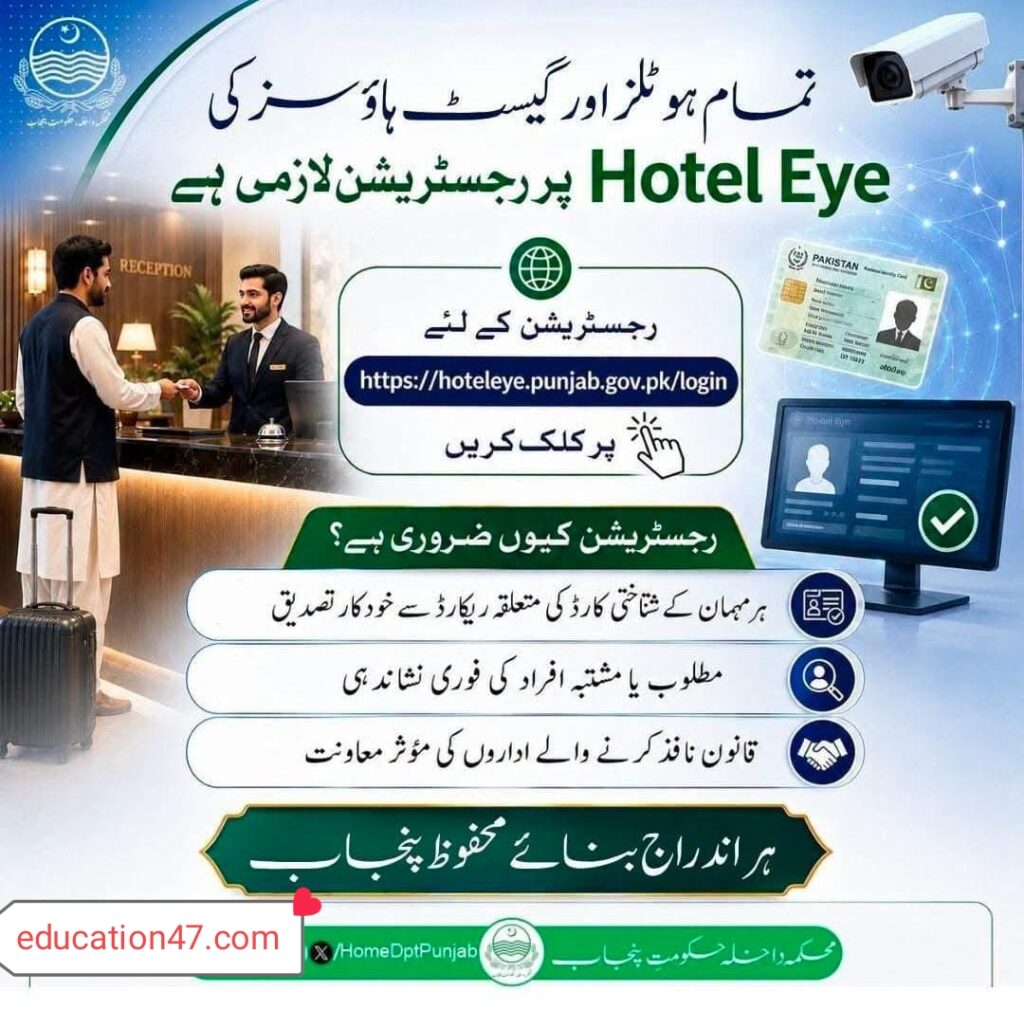
If you are operating a hotel, a guest house, a private lodge, or even hosting travelers through international short-term rental platforms in Pakistan, paper registers are no longer going to cut it. The provincial Home Department has made online guest registration through the centralized digital portal absolutely compulsory.
Let’s break down exactly what this structure is, why it is now strictly policed, and step-by-step how you can set up your property on the portal to avoid heavy legal penalties.
What Exactly is the “Hotel Eye” System?
For years, the hospitality sector in Pakistan operated on a delayed reporting model. Every week, hotels and inns would physically transmit paper-based lists of their checked-in guests to local police stations. It was a slow, labor-intensive, and incredibly inefficient procedure. If a wanted offender checked into a room on a Monday, the police might not find out until the following weekend—long after the suspect had checked out and vanished.
To solve this gaping security hole, the Punjab Information Technology Board (PITB) developed Hotel Eye for the Punjab Police.
Hotel Eye is a secure, authentic-time web application designed to log guest check-ins and check-outs instantaneously. When a receptionist enters a guest’s Computerized National Identity Card (CNIC) number or passport details into the framework, the platform does not just save the name in a database. It instantly cross-references that ID number with live governmental databases:
- NADRA (National Database and Registration Authority): For instant identity verification.
- CRO (Criminal Record Office): To scan for active criminal records.
- PSRMS (Police Station Record Management System): To check if the individual is a proclaimed offender, wanted suspect, or court-evader.
If the system flags a match, an automated notification is instantly routed to the local police desk, allowing law enforcement to respond before any security incident can occur. It has transformed physical security by integrating smart, lightweight cloud software into daily hospitality workflows.
The Big Shift: Why Private Guest Houses are Now Target Number One
Historically, smaller guest houses, roadside motels, and exclusive rental apartments flew under the radar. Only large, formally registered hotels were plugged into the framework. Nonetheless, the landscape of travel has changed. With the rise of independent booking websites, thousands of unmonitored personal properties started hosting both local and international travelers.
Recognizing this blind spot, the Home Department issued a strict provincial mandate. Under the legal framework of the Punjab Information of Temporary Residence Act 2015, registration on the Hotel Eye setup is now completely mandatory for all hotels, motels, inns, guest houses, and residential service providers.
If you are renting out a single room or an entire apartment to paying guests, you are legally classified as a lodging provider. Failing to log your guests on this portal can lead to immediate sealing of your property, heavy fines, and the registration of an FIR (First Information Report) against the property owner or manager.
Step-by-Step Guide: Registering Your Property on Hotel Eye
Getting your property registered isn’t as intimidating as it sounds. You do not demand to purchase expensive, proprietary hardware or complex servers. Since the platform runs as a client-side web application, any standard desktop computer, laptop, or tablet with a stable internet connection is sufficient.
Here is the exact operation to get your establishment up, running, and fully compliant.
Step 1: Visit the Official Portal
Open your web browser on your computer and navigate to the official login page maintained by the Punjab Government:
https://hoteleye.punjab.gov.pk/login
Step 2: Requesting Your Credentials
Unlike a standard social media online platform, you cannot simply click “Sign Up” and instantly build an account. Because this portal accesses sensitive criminal databases and NADRA-linked verification paths, accounts must be authenticated and authorized by law enforcement.
- Option A (Online Registration Request): Some districts permit you to initiate the registration form directly on the landing page of the portal. You will require to upload your property registration documents, owner’s CNIC, and firm licenses.
- Option B (Local Khidmat Markaz / Police Assistance): If the online self-registration form is undergoing maintenance, you must visit your nearest Police Facilitation Center (Police Khidmat Markaz) or the office of the Sub-Divisional Police Officer (SDPO). Bring along:
- A copy of the property owner’s CNIC.
- Company registration/partnership deeds (if applicable).
- The exact physical address of the guest house.
- Active mobile number and email address for the property administrator.
- Once verified, the district IT team of the Punjab Police will generate your unique Username and Password and send them to your registered email.
Step 3: Accessing the Dashboard and Configuring Staff Accounts
Once you accept your credentials, log into the portal. The initial thing you should do is head to the “Settings” or “User Management” section to set up individual profiles for your receptionists or front-desk staff.
- Rule of Thumb: Never share the central administrator password with junior shift workers. If a registration error occurs, you desire to look at the audit trail to see exactly which user account made the entry.
Step 4: Logging a Guest Check-In (The Daily Routine)
Every single time a guest walks through your door, your staff must follow this protocol before handing over the room keys:
- Request Original Documents: Ask for their original CNIC (for Pakistani citizens) or a valid Passport with a visa entry stamp (for foreign nationals). Do not accept low-grade photocopies or mobile phone screenshots.
- Input Data Carefully: In the Hotel Eye dashboard, click on New Check-In. Fill out the required fields:
- Full Name (as printed on the document).
- CNIC / Passport Number.
- Active Mobile Number.
- City of Origin.
- Number of Guests staying in the similar room.
- Assigned Room Number.
- Submit the Form: Click Save/Submit. The system will procedure the data in authentic-period. If green, proceed with check-in. If a red alert pops up, follow your standard safety protocols quietly and immediately contact the local police helpline without alerting the suspect.
Step 5: Logging the Check-Out
When your guest pays their bill and leaves, open their active profile on the portal and click Check-Out. Keeping your active guest series accurate is critical; if an incident occurs in the city, the police will check the real-duration active list of your property to ensure its integrity.
Apply Online for Registration
If your guest house or hotel is not yet integrated with the official security network, you can start the integration procedure immediately. Click the button below to go directly to the secure registration page.
Apply Online for Hotel Eye Registration
Technical Requirements & Compliance Checklist
To build sure your front desk is fully prepared, I’ve compiled a quick reference table showing exactly what you demand to keep your structure running smoothly.
| Operational Element | Requirement / Specification | Purpose |
|---|---|---|
| Primary Device | Desktop PC, Laptop, or Tablet | To access the web portal daily. |
| Operating System | Windows 10/11, macOS, or Android (latest) | Compatibility with modern web standards. |
| Internet Connection | Minimum 4 Mbps stable connection | Prevents timeouts when verifying database records. |
| Backup Power | UPS or Solar Backup (minimum 2 hours) | Ensures continuous logging during load-shedding. |
| Required Hardware | Flatbed Document Scanner or High-Res Web Camera | For scanning and archiving physical CNIC/Passport copies. |
| Legal Mandate | Punjab Information of Temporary Residence Act 2015 | The governing law requiring compliance. |
| Maximum Logging Time | Within 30 minutes of physical check-in | Avoids delays that could trigger regulatory fines. |
Real-Life Experiences: Lessons Learned the Hard Way
When my friend primary started using the setup, he ran into several hurdles that almost cost him hefty fines. I spent a weekend at his front desk watching his operations, and we quickly noticed some critical procedural mistakes that numerous guest house owners create.
Lesson 1: The Danger of “Dummy” Data
In the beginning, if a guest was in a hurry or couldn’t remember their exact CNIC digits, the receptionist would occasionally input placeholder numbers like 35201-1111111-1 just to bypass the screen and gain the room booked.
- The Lesson: Never do this. The Hotel Eye backend is integrated with NADRA’s validation APIs. Entering obviously fake or invalid numbers flags your account in the provincial setup as a “Suspicious Activity” profile. It looks like you are deliberately hiding a criminal’s identity. Invariably insist on seeing the physical card or scanning its barcode.
Lesson 2: Handling Browser Latency
Because the portal verifies data against multiple heavy government databases, the structure can occasionally lag during peak check-in hours (usually between 2:00 PM and 6:00 PM).
- The Lesson: We found that running the portal on a clean, updated Chromium-based browser with all extensions and ad-blockers disabled significantly reduced load times. Keep a dedicated browser profile purely for Hotel Eye to avoid extension-related scripts interfering with the database handshake.
Lesson 3: The Foreign Guest Protocol
Logging international tourists requires entering passport numbers and visa details instead of a local CNIC.
- The Lesson: Make sure your staff is trained to locate the actual entry visa page in the passport. Several staff members mistakenly enter the passport issue number or confuse the country of birth with the country of citizenship. Incorrect foreign data entry is flagged quickly during manual audits by the Special Branch.
The Broader Digital Shift in Pakistan’s Governance
This massive drive toward digitization is not isolated to the hospitality and security sectors. Over the past decade, communal institutions across Pakistan have systematically phased out manual paperwork in favor of streamlined, secure online databases.
For instance, if you look at how the general sector manages large-scale operations, digital frameworks have become the absolute standard. A prime sample of this can be seen in the education sector, where the Punjab Government manages thousands of institutions, transfer policies, and educator records through specialized portals. Platforms like Schools STI have revolutionized how communal educators access notifications, apply for internships, and track administrative changes.
Whether it is checking instructor recruitment guidelines on Schools STI or logging traveler details on Hotel Eye, the underlying goal remains the equivalent: replacing fragmented, manual processes with actual-time, transparent, and highly accessible digital portals.
To explore more around digital governance, administrative updates, and official public sector portals, you can refer to the official Punjab Government Web Portal and read about their latest technological initiatives.
Common Mistakes to Avoid to Keep Your AdSense and Business Safe
When documenting your experiences or displaying guides online, ensure you remain fully compliant with both local laws and search safety standards.
- Sharing Active Credentials: Never screenshot your active Hotel Eye dashboard showing actual guest names, CNIC numbers, or check-in logs. Revealing this data violates Pakistan’s digital privacy standards and Google’s strict publisher safety guidelines regarding personally identifiable facts (PII).
- Delaying Logs Until the End of the Shift: Waiting until the complete of the day to enter all check-ins defeats the entire purpose of real-time security tracking. If a flagged individual stays at your property and leaves before you enter their data, you can be held legally liable as an accomplice under the Temporary Residence Act.
- Ignoring System Offline Alerts: If your local internet goes down, do not stop collecting records. Keep a manual backup sheet, note down all CNIC details, and immediately enter them the moment your connection is restored.
Frequently Asked Questions (FAQs)
1. Is there a monthly subscription fee for using the Hotel Eye portal?
No. The Hotel Eye web application is a public safety instrument developed by the Punjab Information Technology Board (PITB) for the Punjab Police. It is completely free to use for all registered hospitality and lodging providers.
2. What should I do if a guest refuses to provide their CNIC?
Under local laws, you must deny them accommodation. Allowing an unregistered guest to stay on your premises is a direct violation of the Punjab Information of Temporary Residence Act 2015 and will consequence in legal action against your establishment.
3. Can I run Hotel Eye on my smartphone?
While the portal is mobile-responsive and can technically be accessed via mobile web browsers, it is highly recommended to apply a desktop computer or a dedicated tablet at your reception desk to ensure easier data entry and barcode scanning.
4. Does the structure task for daytime-only rest houses?
Yes. Any facility that offers temporary lodging—even if it is only for a few hours—must register on the portal and log every single guest who utilizes the space.
5. How do I recover a lost or locked password?
If you obtain locked out of your account, you cannot reset it via standard email recovery. You must contact your district’s focal person at the nearest Police Facilitation Center (Khidmat Markaz) to have your password securely reset.
Final Thoughts: Emphasizing Safety First
At first glance, setting up and maintaining the Hotel Eye system might feel like just another administrative hurdle for your enterprise. But once you see how smoothly it operates and realize how a great deal of it protects your enterprise from hosting high-risk individuals, it becomes an invaluable asset.
By taking twenty minutes to properly set up your portal, train your front-desk staff, and integrate these security checks into your daily operational routine, you are not only saving your enterprise from massive fines and legal headaches—you are actively helping construct a safer, more transparent, and highly digitized Pakistan.
Official References and Quick Resource Links
- Official Registration Portal: Punjab Hotel Eye Login
- Platform Developers & Support: Punjab Information Technology Board (PITB)
- Law Enforcement Authority: Punjab Police Official Web Portal
- Provincial Policy & Public Administration: Government of the Punjab Official Portal
Compulsory Registration for Hotels and Guest Houses